



Want to take advantage of the remarkable worldwide reach of thirty five million people using through Google Display Ads?
Whether you want to put up campaigns to reach cold users who have never heard of you or to remarket to users who have already interacted with your business in some way, Display Ads are an exceptional alternative. The potential reach— and the capacity to show up in highly targeted placements— is remarkable.
So if you want to leverage Google Display Ads for your business, we are going to help! In this segment of our Google Display Ads Ultimate Guide, we are going to show you how to set up Display Ad campaigns.
If you want to learn how to run successful Google Display Ads campaigns professionally, getting proper training is essential. At Softech Study – a leading Digital Marketing and IT Training Institute in Delhi NCR, students learn practical strategies for Google Ads, SEO, social media marketing, and performance marketing. Our industry-focused digital marketing course in Delhi NCR helps learners understand real campaign setup, targeting techniques, and ad optimization used by professionals.
What to Consider Before Running Display Ads
There are a few things you should think about before you begin making your display ads:
- What kind of media will I employ? Do you intend to use still photos, videos, or both? And do those images already exist, or do they still need to be made? Keep in mind that images play a significant role in your advertising, unlike Search Ads.
- What kind of people are you seeking to reach? You don’t want to include every audience segment and every strategic aim in a single campaign because each campaign can target a different audience. Do you wish to retarget customers who have recently added products to their carts? Do you wish to connect with people who are considering purchasing similar products? Choose your target audience and your strategy for reaching them.
- Think about your plan. A strong strategy is the foundation of any successful advertising campaign. In order to assist you decide on the precise copy, images, bids, and targeting options, the strategy pulls everything together. Consider your overarching objective: are you seeking phone calls, sales, brand exposure, clicks, or something else? Ensure that every aspect of your campaign is in line with your ultimate objective.
How to Set Up Google Display Ads
Now that you’ve thought through your campaign’s strategy, it’s time to begin making display ads!
You must register for a Google Ads account if you haven’t already. This is simple to do and just takes a few minutes if you don’t already have one.
You will begin at your Google Ads dashboard’s home screen after creating your account. The blue “New campaign” prompt will be shown at the top of your account overview. To begin creating a Display Ad campaign, you should click that.
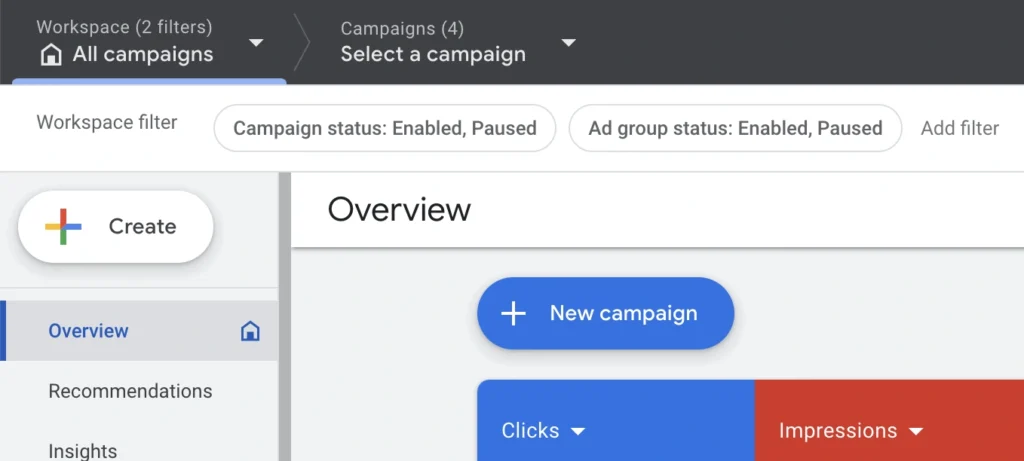
Learning Google Ads practically can significantly improve your career opportunities in digital marketing. At Softech Study, one of the best digital marketing institutes in Delhi NCR, students get hands-on training in Google Ads, display advertising, remarketing campaigns, and campaign optimization. Our expert trainers guide students step-by-step so they can confidently create and manage ad campaigns for real businesses.
Setting Up Your Google Display Ads Campaign
When putting up your campaign, you’re first going to be asked what your goal is. These objectives tell Google what precise activity you want to optimize for, and it may help them show your ad to those most likely to perform that activities.
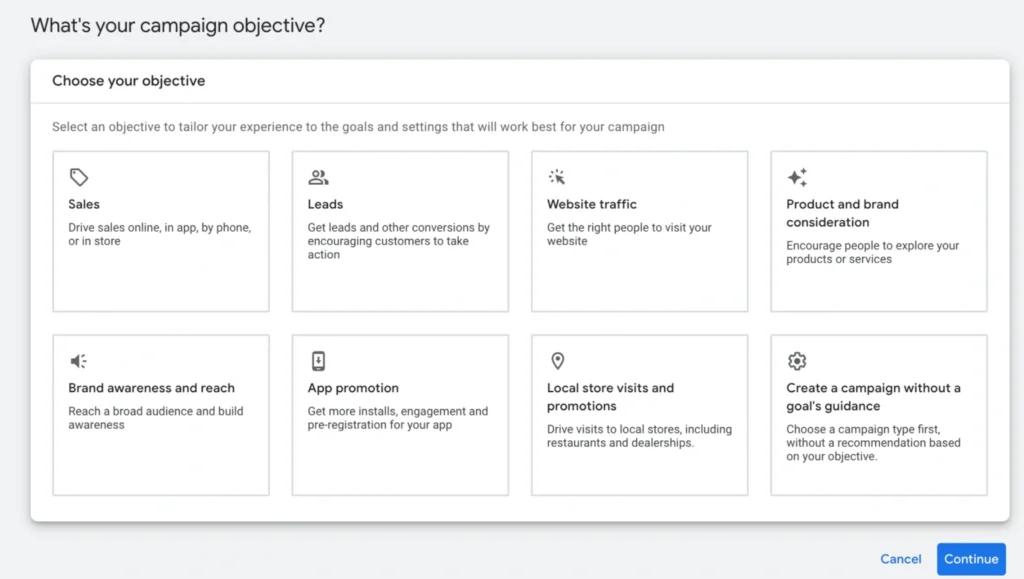
Your settings that will enable for Display Ads are:
- Sales
- Leads
- Website traffic
- Brand awareness and reach
- Creating a campaign with out a goal’s advice
Some objectives will allow you to select additional goals. The sales target, for example, allows you determine if you want to optimize for purchases and phone call leads.
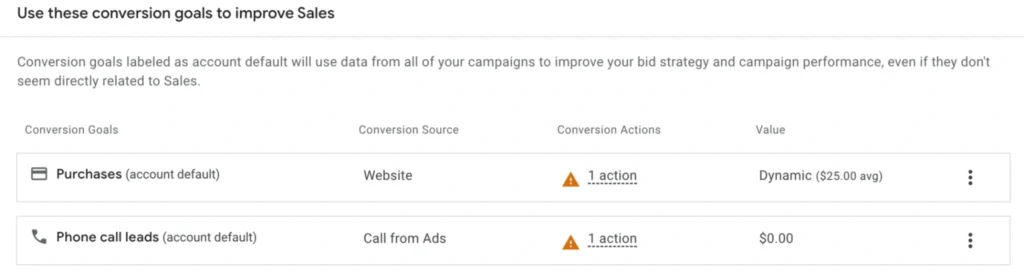
Once you do this, you will see the choice to choose your campaign type. This is where you will click on “Display” to create a Google Display Ad campaign.
After this, you’ll choose which web page visitors will go to; make sure you specify the precise landing page destination you want to send traffic to, and then name your campaign.
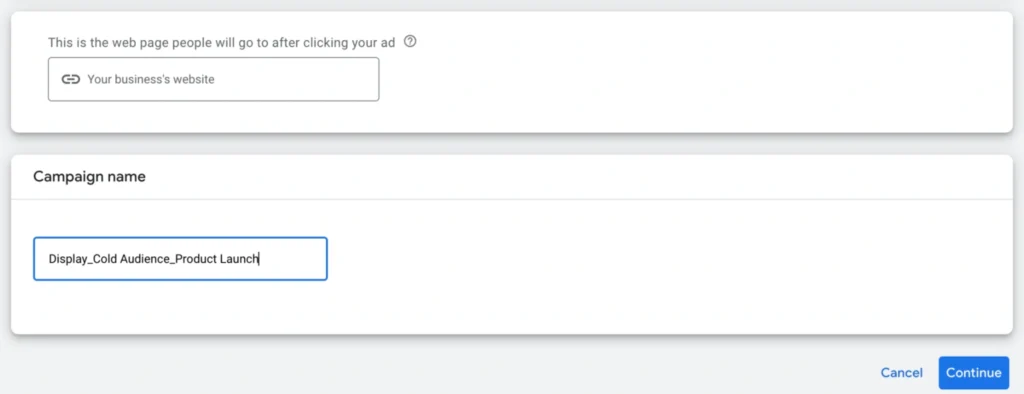
When it comes to naming your campaign, we highly recommend choosing something that is detailed enough to help you discover it during campaign administration.
Using a systemized approach like “[Campaign type] – [audience type]- [specific defining attribute]” might be handy as you scale your campaigns over time.
Next, you will set up basic campaign settings. You’ll be prompted to specify the areas you wish to target, and which languages your clients speak. Keep in mind that you can develop multiple campaigns for each language spoken so that your ad is always relevant to users.
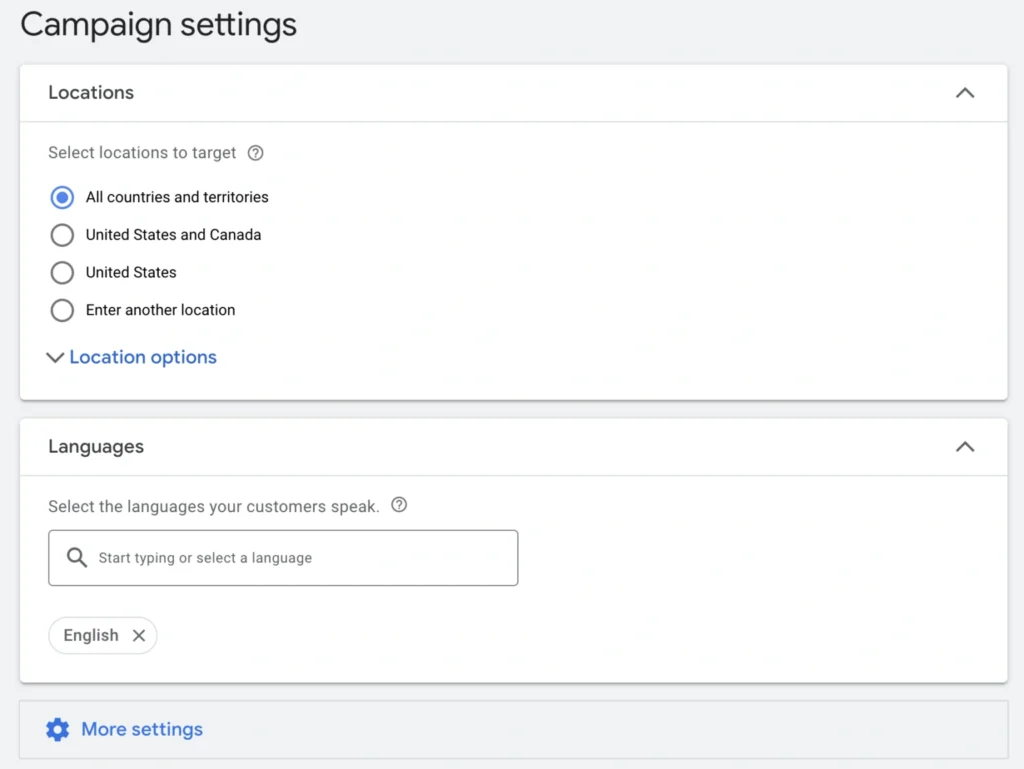
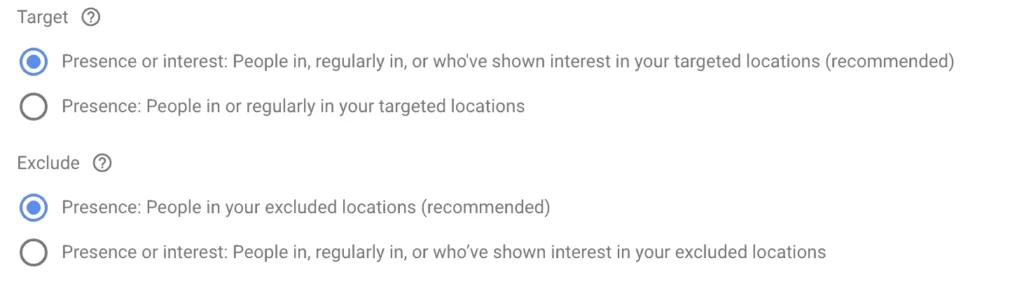
When setting your location, you can utilize inclusion or exclusion-based targeting that either targets (or doesn’t target) individuals who are in, regularly in, or who have shown interest in your places, or only those who are in or regularly in specified locations.
So you can either target people who are in a given location or target all users but those in that location.
Under this, you’ll notice a “More settings” option. If you click on it, it will provide you multiple opens you can take advantage of.
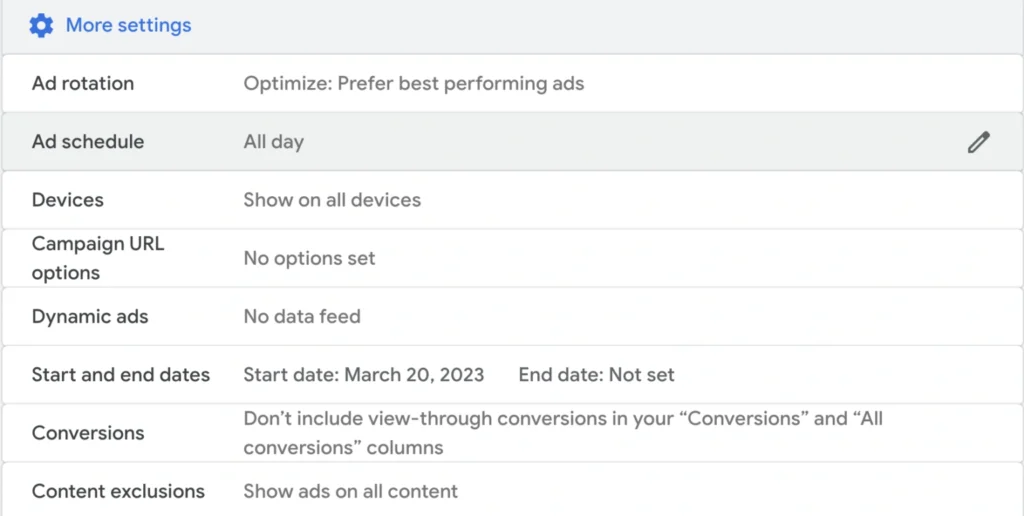
These possibilities include the following:
- Ad rotation allows you to select how advertising are shown; the default is to let Google optimize based on the best-performing ads, and we recommend leaving this alone.
- Ad scheduling allows you to set up ad dayparting (or only showing your ad at particular times of the day or days of the week). In most circumstances, we do not advocate this; it’s preferable to target people when they’re actively online.
- Devices allow you to pick which device types you want your ad to show on
- Campaign URL settings allow you to establish up tracking templates. Keep in mind that after you add a Google tag on your site, you will be able to have tracking information saved automatically.
- Dynamic advertisements will leverage data sources to create personalized adverts for users.
- Conversions allow you to omit view-through conversions under the “conversions” and “all conversions” columns in your metrics
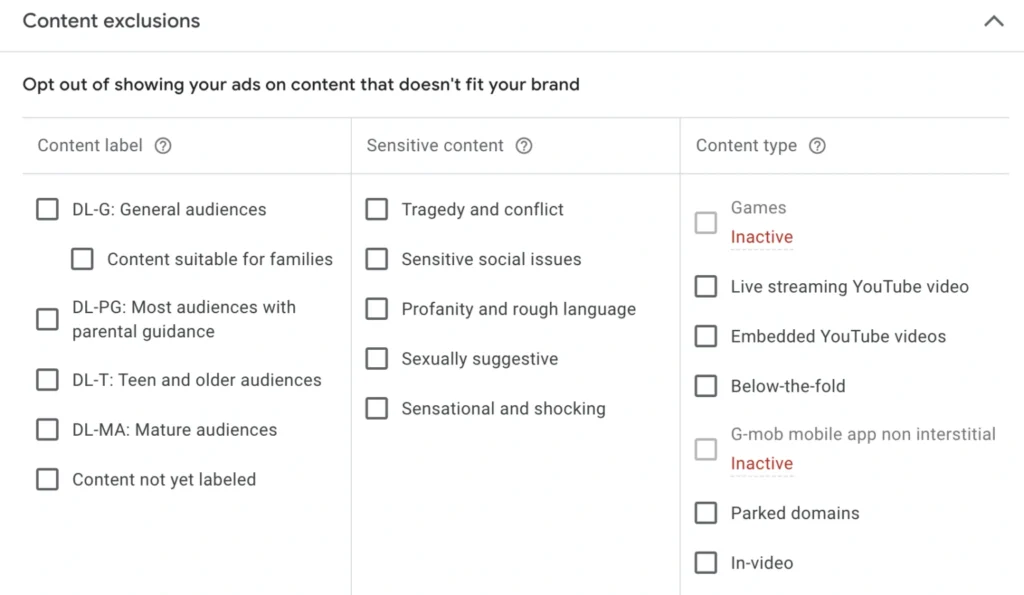
- Content exclusions allow you to prohibit your advertising from showing on content that does not align with your brand. Options include selecting out of content that refers to tragedy or violence, mature audiences, sensitive societal topics, or even sorts of content like in-video placements.
Choosing Your Bidding
Setting up your budget and bidding is the next step in the campaign building process.
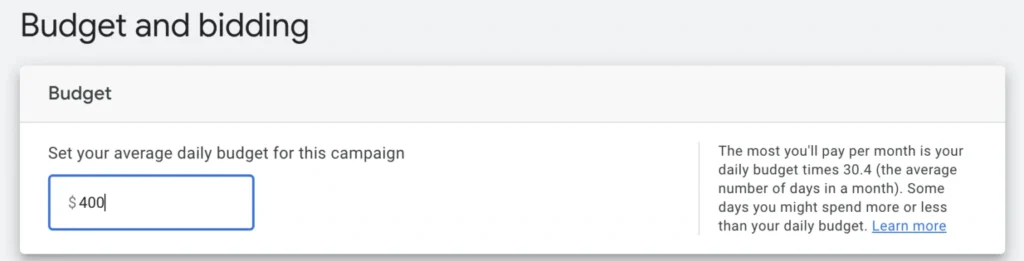
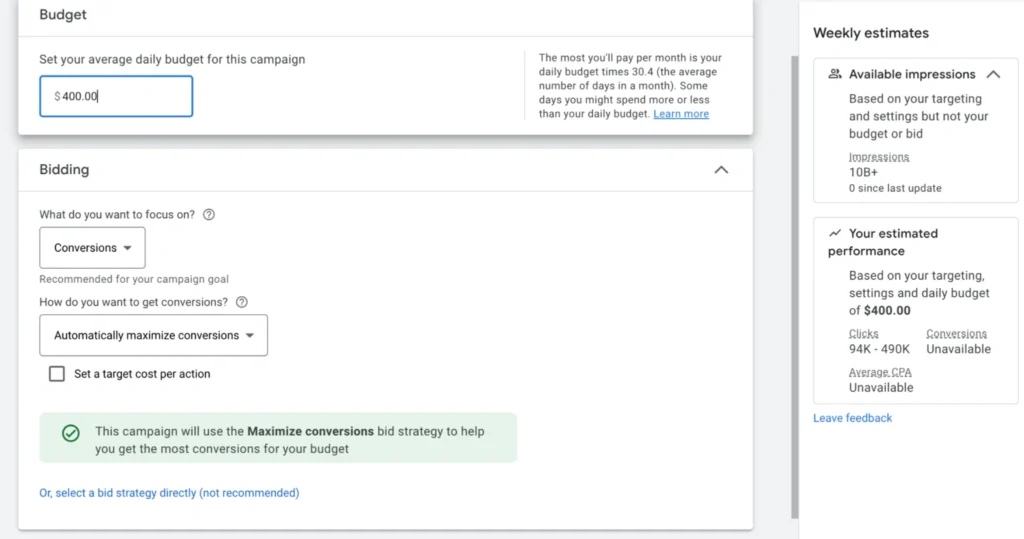
First, let Google know how much you plan to spend on this ad on average each day. The daily budget x 30.4 is the highest amount you will ever pay each month, however some days may cost a little more or less. Generally speaking, everything will average out unless there is a deliverability problem.
You can change this figure at any time, but make sure you’re accounting for every campaign that has to fit into your marketing budget.
You will then place your bid. As a brief summary, you will be able to select the actions you wish to optimize for and the bidding method you wish to employ.
We have a whole section on Google Display Ads bidding here. When all else is equal, Google will make recommendations depending on your ad type and goal, and these are frequently good ideas.
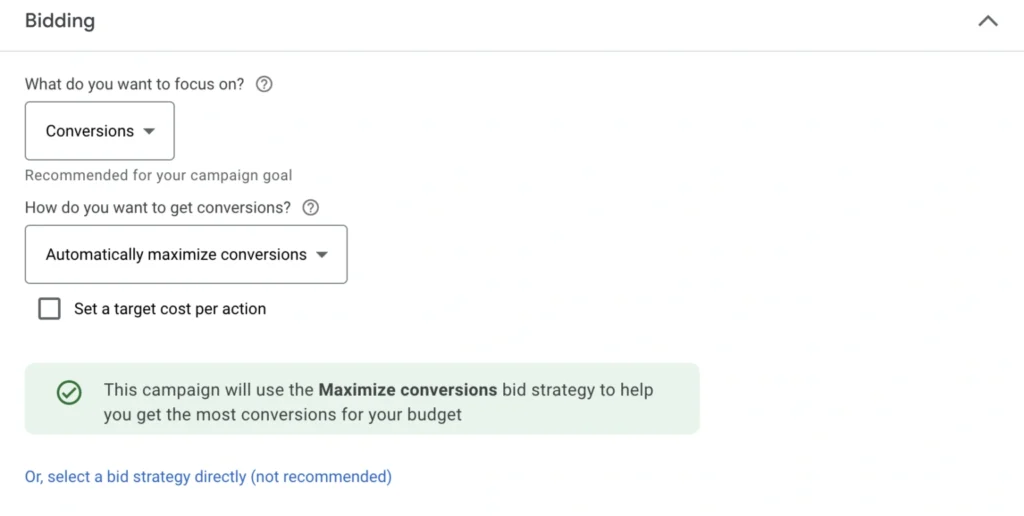
For some kinds of campaigns, you may define a target cost per action that lets Google know about how much you want to pay for the action you’re optimizing for (such as video views, conversions, or site hits).
Although it might limit the amount of placements you are qualified for, this cost-control strategy might help you make sure you aren’t paying more than you wish per action.
On the right side of the page, you can get weekly projections of projected clicks and conversions depending on your budget and bidding strategy while you make these choices. This is a useful point of reference to gauge your potential reach.
Choosing Your Targeting
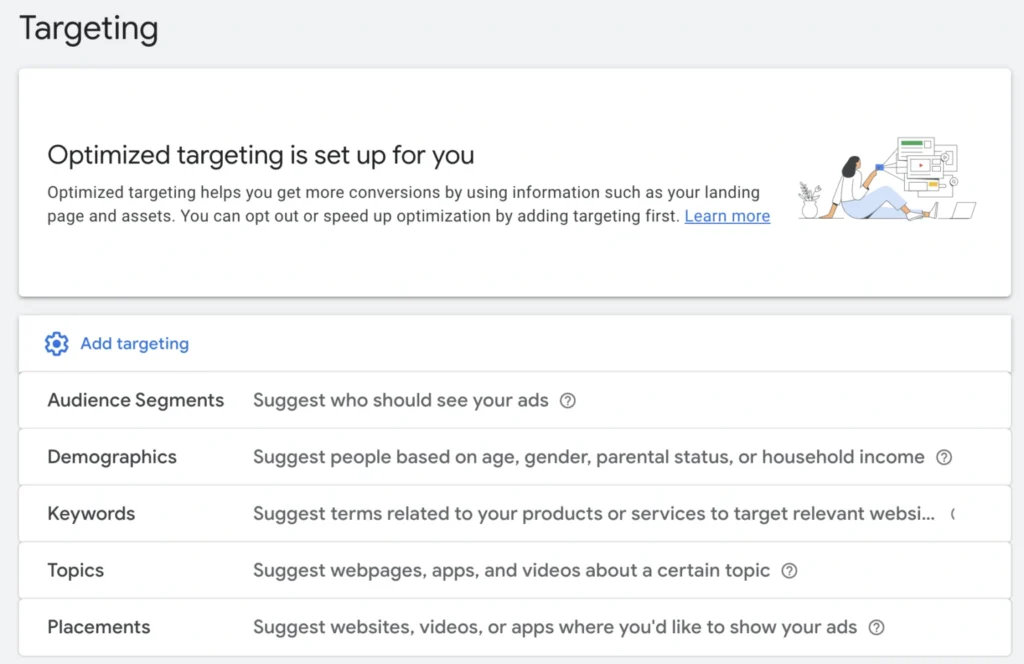
We go over Google Display Ads targeting choices here in great detail, so make sure you read this chapter of our Ultimate Guide.
As a quick reminder, though, there are a number distinct basic targeting possibilities, which include the following:
- User behavior
- User demographics
- User interests
- Retargeting depending on their interactions or relationship with your business
- Placement-based targeting, where you can choose the types of sites you want to appear on You can stack multiple audience attributes using audience layering to build unique audience segments that allow you to reach highly precise categories of users.
Setting Your Google Display Ads Creatives
Finally, but just as importantly, it’s time to produce your creatives. Thankfully, Google is a great resource for this.
Enter your company name and URL first.
After that, you can upload up to fifteen pictures. At least one landscape photograph (preferably 1200 x 628 pixels with an aspect ratio of 1.91:1) and one square image (600 x 600 pixels with an aspect ratio of 1:1) are required.
Additionally, you can add up to five logos. An aspect ratio of 1:1 (128 x 128 pixels minimum) or 4:1 (512 x 128 pixels minimum) is required for these.
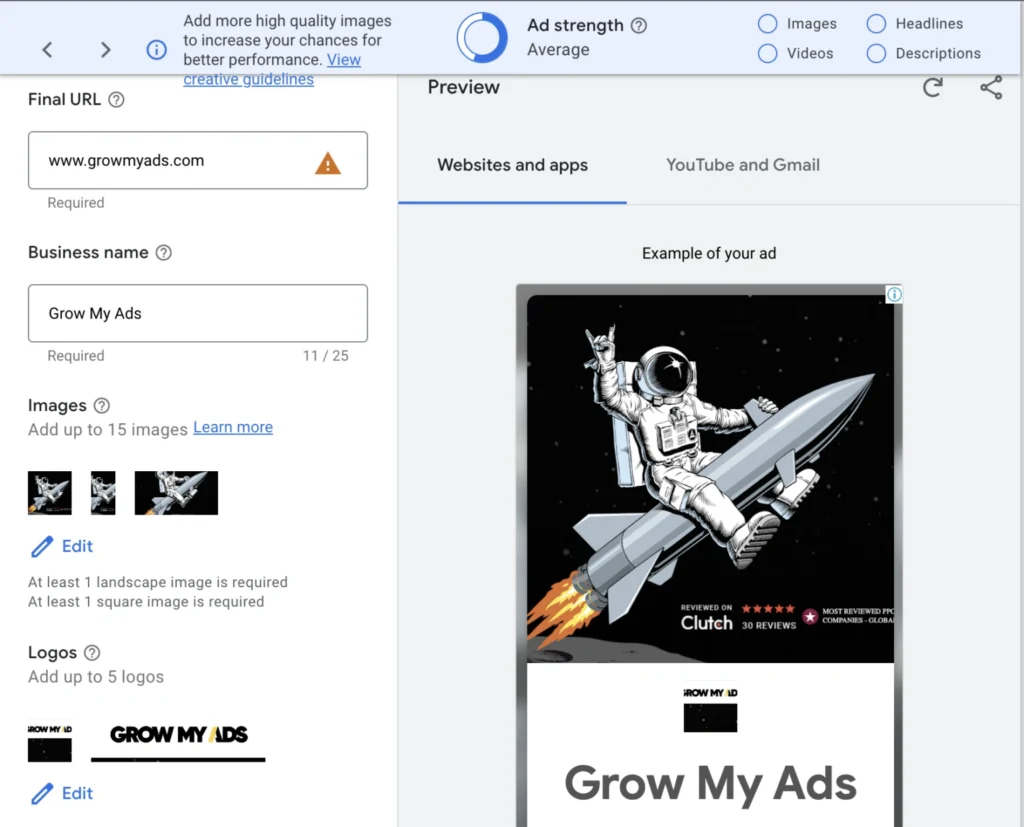
On the right side of the screen, you can see a preview of these photographs in various ad placements. Additionally, you can pay attention to the “ad strength” feature at the top of the page when you are creating your advertisement.
You can add your own videos after you’ve added pictures. This can help you appear in more places, but it’s not necessary.
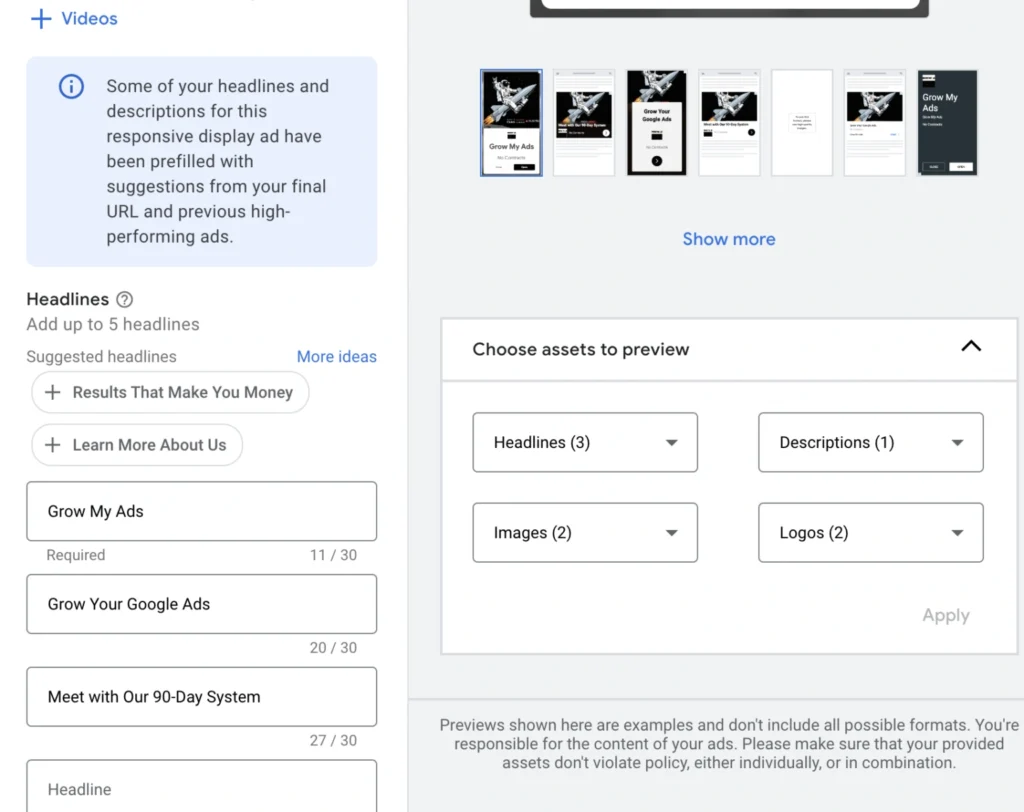
It’s time to submit your advertisement copy after doing this. Google will recommend up to five ad headlines based on your landing page. The maximum length of a headline is thirty characters.
Add a single, lengthy headline after that. This is mandatory and may contain up to 90 characters.
Lastly, include a maximum of five 90-character descriptions.
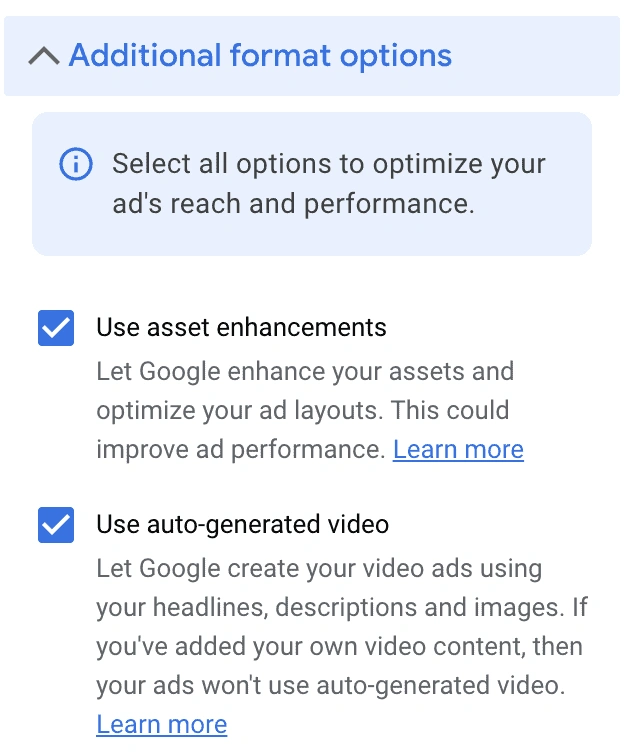
You can also activate or deactivate two additional features underneath the ad copy options.
One is auto-generated video, which only appears if you haven’t made your own videos and is produced by Google using your headlines, descriptions, and images.
The second is that you can optimize your ad layouts by using asset upgrades.
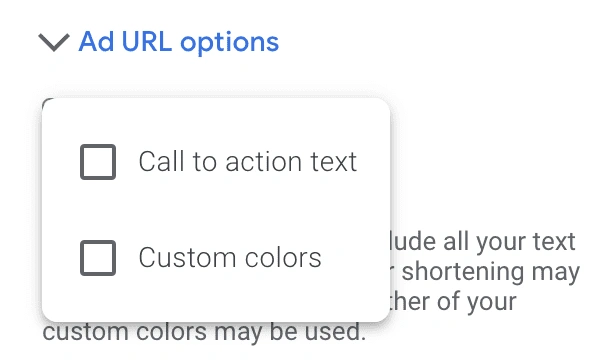
Lastly, you have the option to offer URL choices that use custom colors or contain CTA text.
This completes the creation of your campaign. Examine your creatives thoroughly; check for mistakes and formatting, make sure your messaging is accurate, and make sure all of your images look fantastic. After that, go over your entire campaign and send it in!
Should I Use Performance Max Campaigns Instead?
This is a fantastic question, and it’s one that we’ve had clients ask a lot about recently.
As a quick review, Google’s relatively new Performance Max campaign is a goal-based campaign option that allows advertisers to access their entire Ads inventory in a single campaign. It’s essentially a replacement for Smart Shopping advertisements, and it allows you to create ads across numerous platforms in the Google Network, including Display ads.
We’re fans of Performance Max campaigns, but it makes the most sense to use them when you have a specific campaign you want to construct that will stretch across all platforms.
There’s nothing wrong with deciding to build discrete Display Ad campaigns and keeping them distinct, especially when you only actually need Display Ad campaigns for the purpose in issue.
Both campaign types have their place, so don’t feel like you need to employ Performance Max if it doesn’t line up with your immediate aims for that particular ad.
Google Display Ads Best Practices
When generating Google Display Ads, the following best practices will help you optimize your campaigns:
- Include as many relevant creatives as you believe are a fit. Up to the campaign limitations, of course. We don’t recommend utilizing 15 solely to fill space, but if you have 15 photographs that are an amazing fit, feel free to add them. Google will test and optimize your advertising accordingly.
- Use the finest quality photographs and videos possible. You don’t want to conform to the minimal pixels suggested by Google. Increased pixels will produce higher-quality photos and movies.
- Consider dynamic display ads. Dynamic display advertisements can enable you produce a big number of diverse ads at scale, all owing to Google’s skills. These should be tested, and as with all automation, you’ll want to keep a careful check on how they work if you do enable them.
Final Thoughts
You now know how to put up great Google Display Ad campaigns, so you can get started on new ads that will help you reach your audience all throughout the internet. Make sure you have a look at the following chapter in our book, which explains you how to build up remarketing campaigns on Display Ads.
If you want to master Google Display Ads and other advanced digital marketing strategies, enrolling in a professional course can make a big difference. Softech Study, a trusted Digital Marketing and IT Training Institute in Delhi NCR, offers practical training, live projects, and expert guidance to help students build successful careers in digital marketing.
Learn Google Ads and Digital Marketing with Softech Study – Best Digital Marketing Institute in Delhi NCR.